
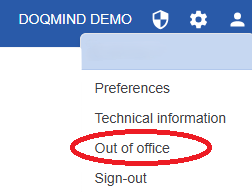
You can access the Out of Office section by clicking your avatar in the top-right corner and selecting Out of Office from the menu.
My Absences

By default, this page shows an overview of all your current and scheduled absences. You can use filters to quickly find a specific absence.
Using the hamburger menu next to an absence, you can:
-
Edit or delete scheduled absences
-
Cancel an active absence
When you cancel an active absence, its end date is set to yesterday, marking the absence as completed.
My Coverage
This section shows all current and scheduled absences where you are assigned as the covering collaborator, so you know when you’re responsible for covering someone else’s work.
In the My Tasks module, you can recognize these tasks by hovering over the actor avatar. It will show “on behalf of”.