
Using drawing tools in the DOQMIND viewer
Drawings help you mark up an asset visually so that comments and notes are easier to understand. In the DOQMIND viewer, you can add shapes, arrows, freehand markings and text callouts directly on the asset. Drawings can also be exported as PDF native notes.
Available drawing tools
Open the drawing tools menu in the viewer to choose the type of markup you want to add.
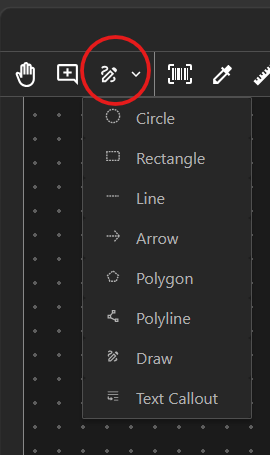
The viewer supports the following drawing types:
-
Line
-
Rectangle
-
Circle
-
Arrow
-
Polygon
-
Polyline
-
Freehand drawing
-
Text callout
Create a drawing
-
Open the asset in the DOQMIND viewer.
-
Select the drawing tool you want to use from the drawing tools menu.
-
Click or drag on the asset to place the drawing.
-
Complete the drawing. For multi-point shapes such as polygons or polylines, continue clicking to add points until the shape is finished.
Edit drawing properties
After you create a drawing, select it to display the floating menu bar. Use this menu to adjust the drawing so it clearly highlights the correct area.
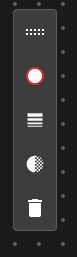
From the floating menu bar, you can:
-
Change the fill colour and stroke colour.
-
Change the stroke size.
-
Set the transparency.
-
Remove the drawing.
Link drawings to annotations
You can connect a drawing to an annotation so the visual markup and the written note stay together.
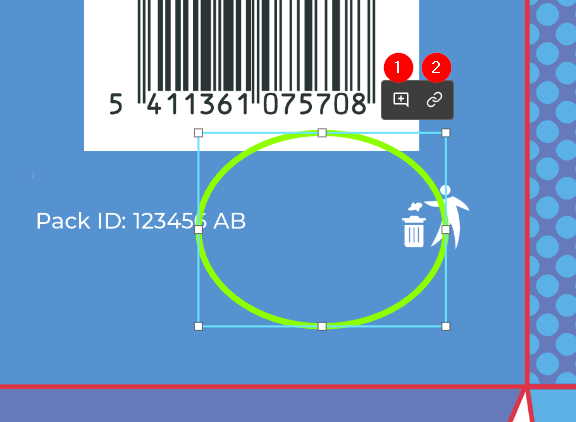
When you select a drawing, choose one of the following options:
-
Create a new note from the selected drawing.
-
Link the selected drawing to an existing note.
A drawing can be linked to only one note. Likewise, a note can be linked to only one drawing.
Tips
-
Use arrows, circles or rectangles to draw attention to a precise part of the asset.
-
Use freehand drawing when you need a quick visual mark-up.
-
Use a text callout when the explanation should appear directly on the asset.
-
Adjust colour, stroke size and transparency to keep the drawing visible without hiding important content.