
For a general overview, please see the article dedicated to the task-type: Parallel approval
Scenario
We require all the assets in a project to be approved before continuing to the next stage of the project.
Upon starting a project for developing a piece of packaging, we want to gather all of the assets that make up the final piece of packaging.
A lot of these different kinds of assets come from different teams.
-
the pack engineers will be providing a technical drawing of the package, a cf2 file for example
-
the designers will be providing graphics, images and artwork
-
Regulatory will be providing text assets containing ingredients and nutrition facts
-
etc…
Since these are different teams, it is not easy for us too coordinate the timings of these assets arriving.
We will have to find a way to ensure all of the assets are approved before we continue to the next stage of the project.
Challenge
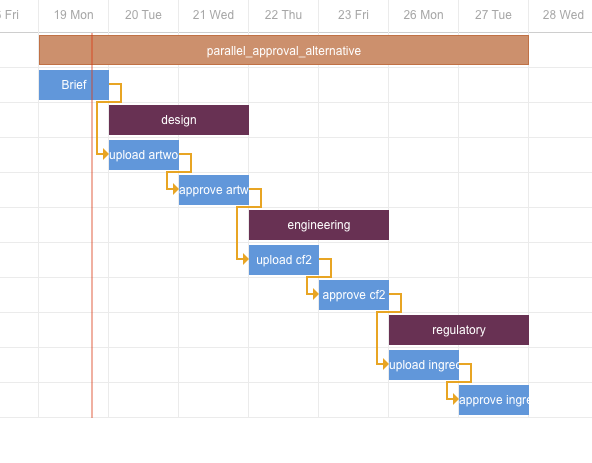
We can achieve this funnel point in the project by creating several approval tasks and chaining them together in succession. Only when the previous task is finished, will the next task be started.
This will ensure that by the time the last asset is approved, all of the previous assets in the chain were approved as well and we can continue the project with only approved assets.
This will have the desired end result, but will leave a bit to be desired regarding efficiency and flexibility.
We might also consider uploading all of the assets at once, in one upload task, and approving all of the assets at once, in one approval task, but this doesn’t present the actor with the possibility of differentiating between the assets. If one asset gets rejected, all of the other assets also require a re-cycle.
An other consideration to make here is that the order is completely set in stone. If the asset for the last approval task happens to be ready earlier than the first approval, we still have to wait for the first one to be ready.
Approach
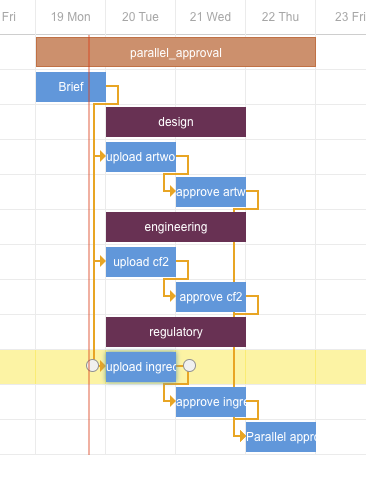
By using the “Parallel approval“ task, we can let multiple approvals run simultaneously and independently while maintaining control over their status. The desired result is that we only proceed once all of the approvals running in parallel are approved. This needs to be done while maintaining space for every separate approval to generate a potential re-cycle.
The provided example has 3 different task-groups, each containing an upload and an approval task. All of the upload tasks are connected to the same “fill in the form“ task, called “Brief“. This means that all of are upload tasks will be initiated at the same time.
On the other hand, all of the approval tasks are connected to the parallel approval task.
Configuration
Execution