
In the fifth release of 2025, we made small improvements across the system
Project management Improvements
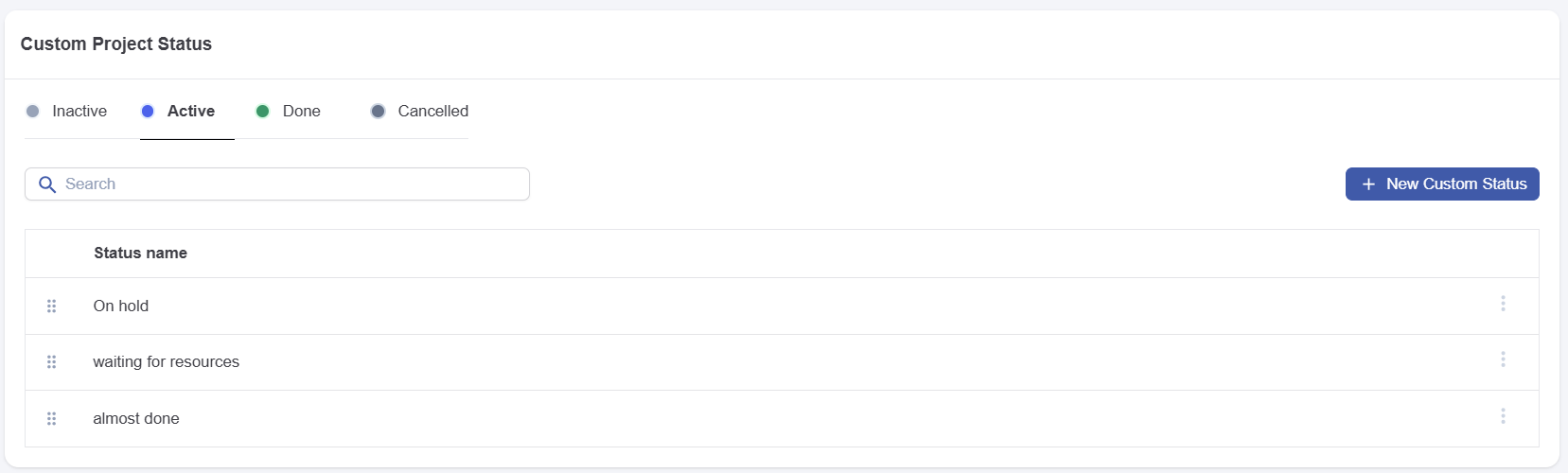
Custom project status
You can now define custom project statuses to better organize your projects. These statuses map to existing ones and do not affect project execution. They serve for categorization and organisation. For more information, see Projects | Custom Project Status.
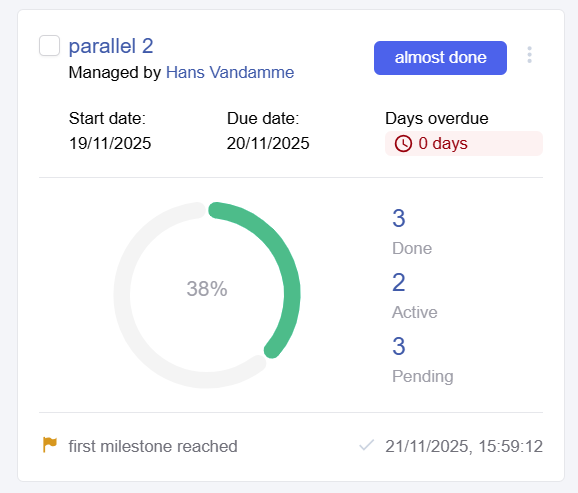
Show milestones in project overview
We now show the latest milestone that has been reached in the project card view. For more information, see Milestone | Do not show as milestone in project overview.
Deadline improvement
DOQMIND enables project managers to set project deadlines. We have already allowed filtering by deadlines and displayed them in the Gantt chart. This release adds a user right permitting administrators to designate who can set deadlines. We also send notifications if a project is unlikely to meet its deadline based on current progress. In a future release, we will allow administrators to configure recipients and timing for these notifications. For a full look at the list of Projects rights, including the new “Set project deadline” right, see https://doqmind.atlassian.net/wiki/x/QgBqBQ.
Gantt export contains colors
We improved gantt chart PDF exports to include markup. The export colors now match the user interface, making it easy to identify overdue tasks.
Asset improvements
We made some improvements on searching on basket content. The basket status has been added to the ‘in basket’ detail in asset list view

We improved search capabilities. You can search baskets by 'sent to' and assets by their use in specific baskets.
Viewer
Blinking mode
This release introduces a new method to compare assets. Previously, we offered a slider to slider between two versions, a side-by-side view, and a delta view highlighting pixel differences. The blinking mode automatically alternates between the two versions or lets you blink manually using keyboard shortcuts. See Compare modes | Blink for details on blinking mode.
Delta parameters
We improved the delta mode in compare (the pixel difference highlighting method). You can now configure difference colors, visibility of common elements, and whether to consider anti-aliasing during comparison. This lets you fine-tune the compare feature to detect differences more easily. See Compare modes | Delta for details on delta mode.
General Improvements
-
Edit saved searches: You can now edit the parameters of your saved searches.
-
Preference screen improvements: Preference screen was updated to improve usability.
-
Cookie banner: Doqmind displays updated privacy and cookie policies to new users (cloud only).
-
Clear active filters: Active filters on assets or projects no longer persist across sessions. Logging out and back in resets filters to your defaults.
-
User tier in user management: User management now displays the user tier for invoicing (cloud only). This tier also appears in exports.
-
Can control invitation mails: User management now displays the user tier for invoicing (cloud only). This tier also appears in exports.